top of page

Voiceitt
Mobile app
Voiceitt app is without a doubt the most meaningful project I took part in. The goal of this app is to help people with a severe speaking disability to communicate with their surroundings by using speech recognition technology.
Voiceitt was designed to understand non-standard speech patterns and its core mission is to make voice recognition technology truly accessible to more than 100 million kids and adults all over the world.

The project
Context
At the time I joined the project the client already developed a basic beta app that was used for developing and testing the voice recognition servers. A big group of testers from different countries used the app daily and shared their experience.
Goal
Designing a mobile app for iOS and Android. The user will speak to their phone and the app will repeat the words in clear pronunciation.
My role
-
Working directly with the client
-
Managing efforts, time frames, and resources.
-
User research
-
Competitive research
-
Product concept
-
UX design of the entire app
-
Working with the design team
Research
First step
Every project starts with research. In order to design a product, I have to know every aspect of it, who will use this product, what are the client's business goals and which are the product competitors.
For this project, I had another reason to gather more data. The head of R&D opposed every change to their app, which will make the app more friendly to the user. The data I gained in this research helped me to convince him to agree with me.
I researched 3 aspects of the product.
1. Product research
The product includes both the app and the server.
I interviewed the head of R&D and his team to understand how does the voice recognition server works and how it affects the app and the user.
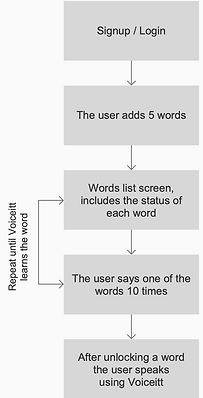
I also tested the app and went through the full user flow, from signup to the point when Voiceitt recognizes the words I recorded.
At that point, the user flow was simple. However, technical constraints required the user to record each word 30-50 times before it will be recognized by the server and the user could use it.
2. User research
The users in this project are people with severe disabilities and I had to learn how they use the app, what they are able to do, and what are the differences between different users.
I made a list of some basic tasks I wanted the user to do with the app, like tapping, long press, swipe, etc.
I tested 8 users in daycare institutions and at their therapist clinic, and watch videos of a dozen other users from the USA and Italy.
I found out that each user has different disabilities using a mobile app. Another challenge that came up during the research was that the users couldn't choose which words will actually be helpful for them.

This is Jeremy.
Jeremy has a speaking disability caused by jaw and mouth impairment.
This is Jeremy's first day at his new job in McDonald's. He trained Voiceitt to recognize the way he pronounces the sentences required to communicate with the customers.
In this video he has the last practice with his father.
01:07

This is Avi.
Avi has Down's syndrome. He is not independent and needs constant care.
In this Video Avi is training Voiceitt to learn how he pronounces his words.
It is obvious that it is not easy for him to repeat the words over and over again.
Eventually, Avi stopped the training session before he completed it.
02:32
3. Competitive research
The research needed to answer 2 questions:
Our app aimed to give the user a seamless experience - the user speaks to the person in front of them, and the app will repeat them with perfect pronunciation. Therefore, I had 2 main questions about other products:
-
Which solutions other products use?
-
How other apps recognize speech?
Other solutions
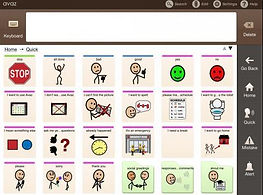
I researched several leading apps and found out that their solution is quite the same - a digital communication board, similar to the ones attached to some of their wheelchairs. Some of the apps are more advanced and have features like adding new words or have the words sorted by scenes or types, like People, Time, Beach, etc.
Proloquo2Go

Clicker

Avaz
Lamp

Go Talk

Sono Flex

Voice recognition methods
At that point, after the product research, I realized I have to find a solution to the long and tedious speech recognition process that requires the user to record each word 30-50 until it could be recognized. I tested 2 methods.
1. Quick and simple - this process is almost seamless, but it requires
very advanced technology as Amazone and Goole have.
Alexa - Amazon
The user says 4 sentences.
Google - Assistant
The user says the waking words 5 times.


2. Since Voiceitt technology is not as advanced, I had to find ways to make this process more delightful.
I researched language learning apps that have similar challenges as Voiceitt. I olso researched games apps and read relevant documentation to find out how I can add some gamification to the recording process.
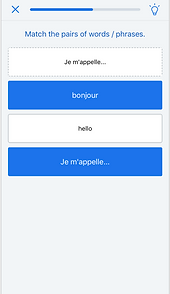
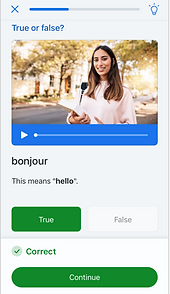
Language learning apps use gamification in many different ways to engage the user to the learning process and have him stay in the app for a longer time.
Similar game features appeard in games app
Matching word game
True or false
Card game

Card game

Challenges

Earning badges

Earning coins

Score board

Score board

Adding gamification to the app, especially to the recording process is a must, but it has to be adjusted to our unique users.

MAJOR PAINS
Concluded from the research
1
2
3
There isn't a clear definition of the user, specifically regarding his abilities to tap the phone's screen and read.
The training process is long and tedious. The user gives a big effort without receiving any value.
The user is free to add any word he likes. I found out that many users don't know which words will actually be useful for them so they end up with vocabulary they don't need and often abandon the app.
In order to move on to the design phase, I had to find a solution to these pains, that is agreed upon by all the stakeholders.
I summon a few meetings to talk about these pains and how to solve them.
I chose to talk with everyone that has a say on the client side to hear their opinion, but also because people tend to agree more often if they feel that their opinion was heard and considered.
Pain
1
The user of the app is not defined
In our meetings, I explained to the client (not for the first time) how important it is to define the user in order to start designing an app that is suitable for public distribution.
Eventually, the decision was made:
Our user can hold the phone and tap it.
He can either read from the screen or listen to instructions.

Jeremy is our user!
Pain
2
The training flow is long and tedious
The training flow in which the user train Voiceitt to understand his words was definitely tedious.
Inspired by the gamification research I decided to design this process as short games which are activated by the user's words.
Pain
3
The users don't choose useful words
Asking a person that can't speak properly to choose the words he uses the most is doomed to fail.
The user research showed an interesting thing - most of the user has a steady routine. They go to the same places, like school, daycare facility, the doctor and so on.
The solution for this pain is providing the user with words bank per situation. If a user goes to the doctor very often he will choose the "Doctor scenario" and the words and expressions he probably use there.
Screen map
Second step
Based on the data I have from research, I designed a screen map.
The screen map helped me to see the big picture of the product and its features, understand the scope of the project, and to build an effective designing plan.
This stage is a crucial point when I decide what will the app be.
I review all the data I collected, the user's needs and the business goals, and chart the main flows of the app.

Wireframes and design
Third step
The most interesting and unique wireframes I designed in this project are the simple games I created to make the training less tedious and more fun. While designing those games I kept in mind that the user has a mental development level of a child and that the only gesture he can perform is tapping the screen.
Meet Yuvi!
Yuvi is Voiceitt's mascot. I added Yuvi to the app to give it a friendly face and to guide, cheer, and support the users.
In our tests, the users loved Yuvi so much that sometimes they deliberately made a mistake to see it popping up with a motivating message.

Recording (dictionary)
The user records his vocabulary. At this point, the user already recorded his first word in the onboarding stage.
It can be challenging for our users to completely understand the recording process. I made it as simple as possible, and with short instructions. The user has the option to activate a narration feature that will read the instructions for him.
*** some of the screens are designed, and some are just fancy wireframes.
Recording main flow


The user might be confused and find it hard to choose a scenario. Therefore, for the first time he meets this screen, we will choose it for him.
The user can choose to review the expressions list, or to start recording. This is the main screen until the first expression is recognized by Voiceitt (then the Use screen will be the default.


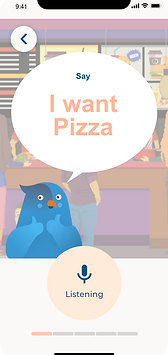
This recording game simulates a real conversation in a restaurant.
The user is required to tap the recording button before start recording. In the research, we found out that the users start speaking before the app starts to listen and record. The solution was adding a short loading indication and change the button design when the recording is on.
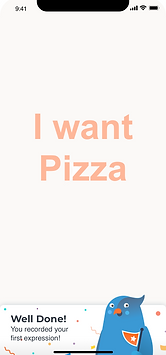


After the first recording, a cheer up message appears.
I used many cheer ups to motivate users to continue recording.
The user records 5-10 expressions in every session.
eventually, he will record each expression 30-50 times.
After completing the first session the expressions list appears. each expression is presented with a progress bar.
After several sessions of recording, Voiceitt recognizes how the user pronounces an expression. Now the user can use it when talking with others by switching to the "Speak" tab.
Recording games
As we understood by now, the recording process is a tedious and exhausting process. Therefore, I created short games fitted to our users, which usually have an IQ level of a child.
The games are simple with very easy challenges.
*** as you can see, these are wireframes, not the UI design.

The user can review his status and all the expressions in his dictionary.

Conversation
Simulates a real conversation in a situation relevant to the chosen scenario.

2

1

5
2
1/5
Reveal Yubi
every time the user says the expression, another brick falls until Yubi is exposed.
The users found it very funny...

1
The expression at the top. There is a pit at the bottom.

2
The expression slowly falls towards the pit. The user says the expression to push it back up.

4
After the 5th recording the session is complete. Hooray!
1
The expression at the top. There is a pit at the bottom.
1/4
Save the expression
The expression is falling to the pit. the user saves it by saying it.
(Hover the screen to read the comments).

1

2

4
1
1/4
Sunset
every time the user says the expression, the sun getting closer to the horizon, until it disappears.

1

2

6
1
1/6
Dip the cookie
The user says the expression to dip the cookie into the coffee mug.

1

2

4
1
1/4
Blow the balloon
every time the user says the expression, Yubi blows the balloon, until he flies away.
Speak
The user stands in front of a person, in a specific situation (doctor, waiter, teacher, etc.) and wants to say an expression that he recorded on Voiceitt.
He switches to the "Speak" tab and says it.
Things that may occur:
-
the user starts speaking before Voiceitt starts listening
-
the user speaks too loud
-
the user speaks too soft
-
Voiceitt doesn't recognize what the user said
-
The person in front of the user doesn't hear Voiceitt

The user taps the button

To make sure the user will not start talking before Voiceitt starts listening, a loading indiction appears for 1 second.

Voiceitt in a listentng mode,
and there are a few posible outcomes. The circle vibrate according to the sound.
Good recognition

Voiceitt says the expression. To avoid embarrassment in case the person he talks to didn't hear, the user can show him the phone's screen.
No recognition / too soft

In thiese cases the user speaks in a way that didn't allow recognition. The user wants to quickly say the expression again so he taps the button and the recording screen appears.
Too loud

If the user speaks too loud Voiceitt can't understand him and the circle expands and turn red. This is a clear visual indicatiion for the user.
bottom of page